Resource Lifecycle
Summary:The Resource Lifecycle describes how we manage resources from curation to ongoing maintenance.
The Resource Lifecycle describes how we manage resources from curation to ongoing maintenance.
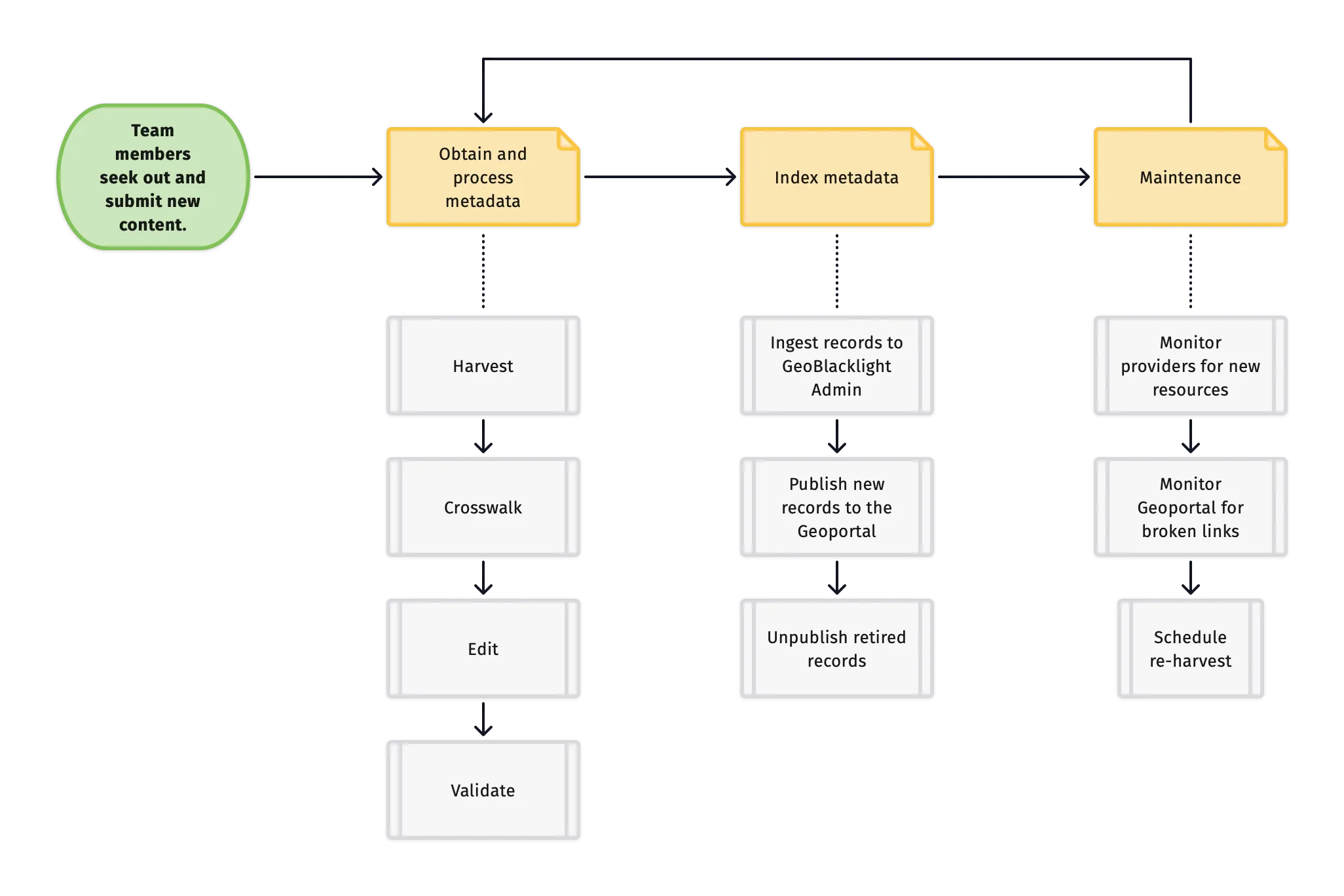
1. Identify
Section titled “1. Identify”:fontawesome-solid-user: BTAA-GIN Team Members and Product Manager
Team members seek out new content for the geoportal. See the Team Member Handbook for more information.
2. Obtain and Process Metadata
Section titled “2. Obtain and Process Metadata”a. Harvest
Section titled “a. Harvest”:fontawesome-solid-user: Graduate Research Assistants and Product Manager
This stage involves obtaining the metadata for resources. At a minimum, this will include a title and and access link. However, it will ideally also include descriptions, dates, authors, rights, keywords, and more.
Here are the most common ways that we obtain the metadata:
- a BTAA-GIN Team Member sends us the metadata values as individual documents or as a combined spreadsheet
- we are provided with (or are able to find) an API that will automatically generate the metadata in a structured file, such as JSON or XML
- we develop a customized script to scrape directly from the HTML on a source’s website
- we manually copy and paste the metadata into a spreadsheet
- a combination of one or more of the above
b. Crosswalk
Section titled “b. Crosswalk”This step involves using a crosswalk to convert the metadata into the schema needed for the Geoportal. Our goal is to end up with a spreadsheet containing columns matching our metadata template.
c. Edit
Section titled “c. Edit”Graduate Research Assistants and Product Manager
When working with metadata, it is common to come across missing or corrupted values, which require troubleshooting and manual editing in our spreadsheets. Refer to the Collections Project Board for examples of this work.
d. Validate
Section titled “d. Validate”After compiling the metadata, we run a validation and cleaning script to ensure the records conform to the required elements of our schema.
3. Index Metadata
Section titled “3. Index Metadata”:fontawesome-solid-user: Product Manager
a. Ingest to GBL Admin
Section titled “a. Ingest to GBL Admin”We upload the completed spreadsheet to GBL Admin, which serves as the administrative interface for the Geoportal. If GBL Admin detects any formatting errors, it will issue a warning and may reject the upload.
b. Publish new records to the Geoportal
Section titled “b. Publish new records to the Geoportal”Once the metadata is successfully uploaded to GBL Admin, we can publish the records to the Geoportal. The technology that actually stores the records and enables searching is called Solr.
c. Unpublish
Section titled “c. Unpublish”Periodically, we need to remove records from the Geoportal. To do this, we use GBL Admin to either delete them or change their status to “unpublished.”
4. Maintenance
Section titled “4. Maintenance”BTAA-GIN Team Members, Graduate Research Assistants, and Product Manager
a. Monitor sources
Section titled “a. Monitor sources”We monitor our sources to check for new and retired contnet.
b. Monitor Geoportal
Section titled “b. Monitor Geoportal”We regularly assess currentness of the content in the Geoportal and check for broken links.
c. Schedule re-harvests
Section titled “c. Schedule re-harvests”We schedule re-harvests from sources based on how frequently they update their content. See the Collections Dashboard for this schedule.
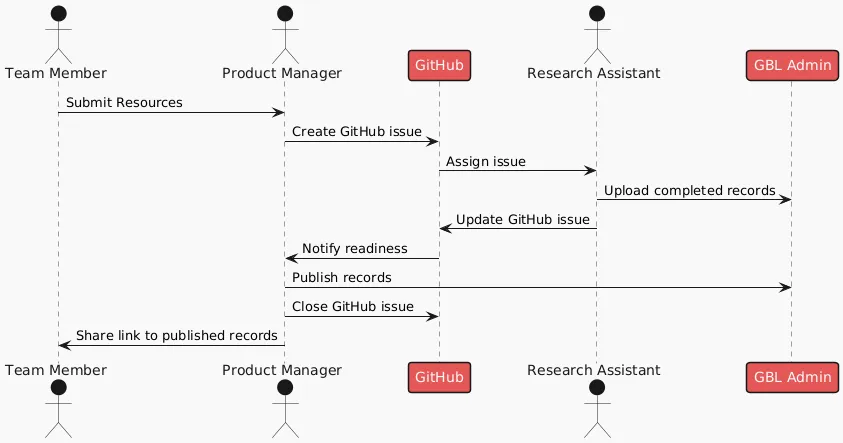
Sequence diagram of processing workflow
Section titled “Sequence diagram of processing workflow”This diagram illustrates the roles, tasks, and communication workflow for Team Members, the Product Mananger, and Research Assistants. The two technologies are GitHub for tracking work and GBL Admin for managing the metadata records.