Data Dictionary Preview
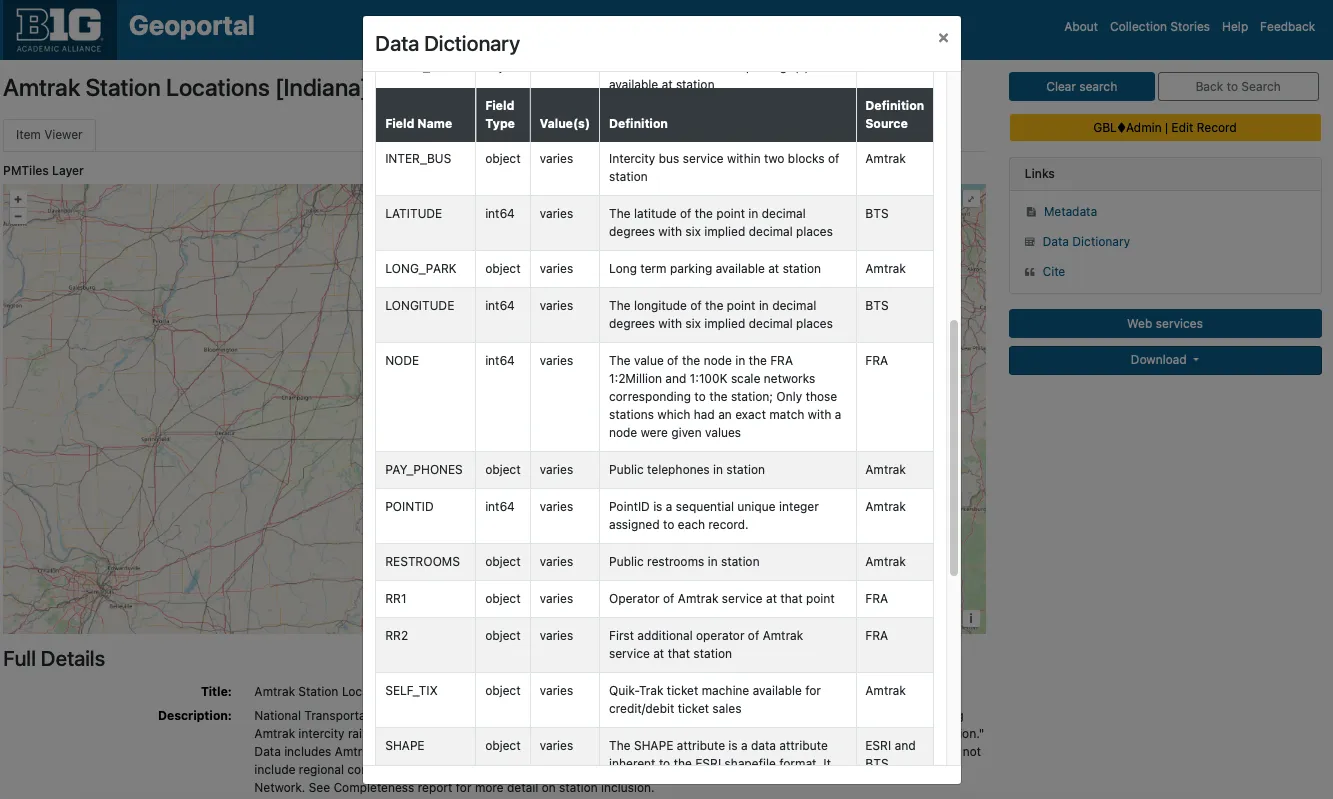
Screenshot of Data Dictionary preview (https://geodev.btaa.org/catalog/btaa-e4a8461e-6cd1-4c45-b6e8-5838bfe6bde3)

Summary:This document reports on the progress of the BTAA-GIN Geodata Collection as of February 2025.
The BTAA-GIN Geodata Collection Groundwork Phase (Q1 2024- Q1 2025) established the technical and metadata infrastructure required for a scalable geospatial data repository. This phase focused on pilot collection development, metadata expansion, workflow refinement, and platform enhancements.
We have implemented several enhancements to our geodata management program to improve metadata quality, user experience, and operational efficiency.
We have introduced seven new metadata fields designed to capture spatial information, provenance, and more precise documentation.
These fields bring us into closer alignment with existing metadata standards, including the ISO 191xx series and the DCAT-3 US Profile.
| Label | Description | Source/alignment | Example |
|---|---|---|---|
Conforms To b1g_dct_conformsTo_sm | The coordinate reference system expressed as a resolveable URI. | This field is from Dublin Core. Our usage aligns with the DCAT-3 profile | Minnesota—Itasca County. (2025). Forest Inventory [Minnesota—Itasca County] 2025. BTAA-GIN. (dataset) https://geodev.btaa.org/catalog/btaa_a42e393b-287e-401c-9c16-64e36dbd6ff5 |
Spatial Resolution in Meters b1g_dcat_spatialResolutionInMeters_sm | The resolution of a raster dataset | This is a custom DCAT-3 field | Indiana. Geological Survey. (2015). Aquifer sensitivity in shallow aquifers [Indiana] 2015. BTAA-GIN. (dataset) https://geodev.btaa.org/catalog/btaa-0d1f5c0e-f93f-4889-be34-16104f9c6927 |
Spatial Resolution as Text b1g_geodcat_spatialResolutionAsText_sm | A description of the resolution for any resource. Can be a scale, distance measure, or other free text. | This is from GeoDCAT, a geospatial profile of DCAT | Indiana. Geological Survey. (2002). County Boundaries [Indiana] 2002. BTAA-GIN. (dataset) https://geodev.btaa.org/catalog/btaa-6b8461b9-040c-4a7c-b09b-fde0c886c7f2 |
Extent b1g_dct_extent_sm | A calculation in kilometers squared of the area covered. We intend to use this to classify the resource by geographic size. | This is a Dublin Core field. Our use of it aligns with their general description, but is somewhat unique. | Olmsted County Planning Department. (2024). Zoning [Minnesota—Rochester] 2024. BTAA-GIN. (dataset) https://geodev.btaa.org/catalog/btaa_a0f42bcd-4108-4526-b6a7-611913f99e5e |
| Label | Description | Source/alignment | Example |
|---|---|---|---|
*Provenance Statement- b1g_dct_provenanceStatement_sm | This is a free text, repeatable field for logging accessions, processing activities, and data sources. | This is a Dublin Core field that has been adopted by DCAT-3. It is a crosswalk from the lineage element in ISO 19139. | New Jersey. Department of Transportation. (2024). Roadway Network [New Jersey] (June 2024). BTAA-GIN. (dataset) https://geodev.btaa.org/catalog/btaa-be6ed641-1e9a-4d4d-932e-97637df152b2 |
*Admin Tags- b1g_adminTags_sm | This is to store local tags to aid in finding and filtering items. Examples are for records cleaned during sprints and metadata updates | This is a custom field that is only useful locally and not intended to be interoperable. |
| Label | Description | Source/alignment | Example |
|---|---|---|---|
*In Series- b1g_dcat_inSeries_sm | This string value links items in a subcollection or series together. | This is a DCAT-3 field. Our usage aligns, except that we are using it as a string instead of a nonliteral. | Maryland. Department of Planning. (2003). Land Use/Land Cover [Maryland—Allegany County] (2002). BTAA-GIN. (dataset) https://geodev.btaa.org/catalog/ba024c69-4738-4bd8-8500-e3e3846a0f85 |
To accommodate the new metadata fields and improve overall consistency, we have augmented our Metadata Entry Guidelines. The revised guidelines offer instructions on populating the new fields and provide updated recommendations for existing fields, especially for internal assets.
The input guidelines for items in the BTAA Geodata Collection differ from the general registry collection.
All records for the GeoData Collection will have an *ID- prefixed by “btaa_”. This will help identify them and differentiate them from the ID of the original source record.
The *Subject- field is reserved for Library of Congress authority terms only.
The *Description- field no longer needs to have the scale, spatial resolution, or provenance concatenated, as special fields are now dedicated to that.
*Geometry- will reflect the outline of the dataset instead of a duplication of the bounding box
*Provenance Statement- should indicate when the resource was obtained and from where
*Publisher- (previously unused for datasets) will be the original distributor/provider
*Provider- will be Big Ten Academic Alliance Geospatial Information Network (or BTAA-GIN during the pilot)
Internal assets should always have a value for the following fields: (unlike external assets, for which this information is optional or difficult-to-fill)
As we expand our geodata collection and storage capabilities, creating derivative files has become an integral part of our workflow. Derivatives enhance the user experience by offering streamlined access and improved visualization of datasets. These files can be batch-generated using desktop scripts, making the process efficient and scalable.
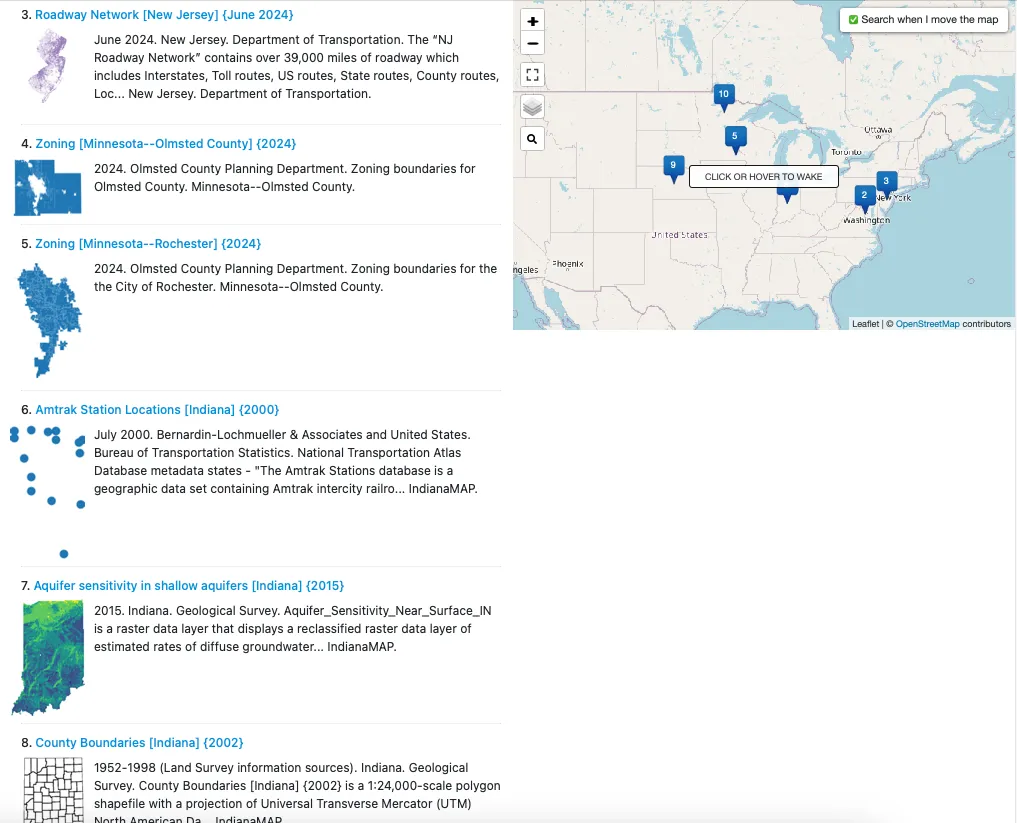
What Are PMTiles?
PMTiles is a single-file archive format designed for storing pyramids of tiled geospatial data. The format supports datasets addressed by Z/X/Y coordinates, including vector tiles, imagery, and remote sensing data. PMTiles archives can be hosted on platforms like Amazon S3, where they are accessed via HTTP range requests. This enables low-cost, zero-maintenance web mapping applications by minimizing the overhead of traditional web servers.
Why Use PMTiles?
PMTiles allows us to create web-friendly datasets that can be embedded into web maps without requiring users to download the data. Unlike traditional geospatial web servers like GeoServer or ArcGIS, PMTiles simplifies deployment and management.
*Current Limitations-
While GeoBlacklight can display PMTiles as overlays, features such as styled layers or querying datasets are not yet supported. These enhancements are part of GeoBlacklight’s future development roadmap.
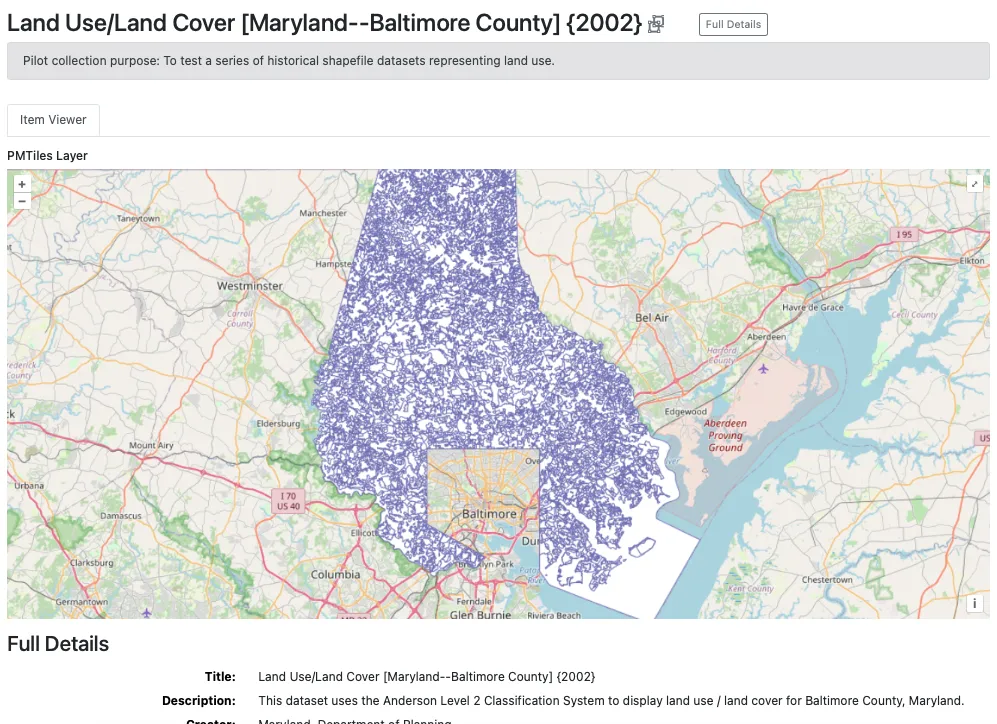
PM Tile showing an overlay visualization of the dataset. Maryland. Department of Planning. (2003). Land Use/Land Cover [Maryland—Baltimore County] (2002). BTAA-GIN. (dataset) https://geodev.btaa.org/catalog/141123e4-d0db-4212-ba04-a30696ffeba8
What Are COGs?
A Cloud Optimized GeoTIFF (COG) is an enhanced version of the standard GeoTIFF format. It is internally organized to optimize data access in cloud environments, leveraging features like tiling, overviews, and streaming capabilities. Clients can retrieve only the parts of a file they need using HTTP range requests, which improves performance and reduces bandwidth.
Why Use COGs?
COGs serve the same purpose as PMTiles for raster datasets, enabling browser-based visualization without the need for a dedicated web server. They are ideal for high-resolution imagery and other large raster files.
Key Features
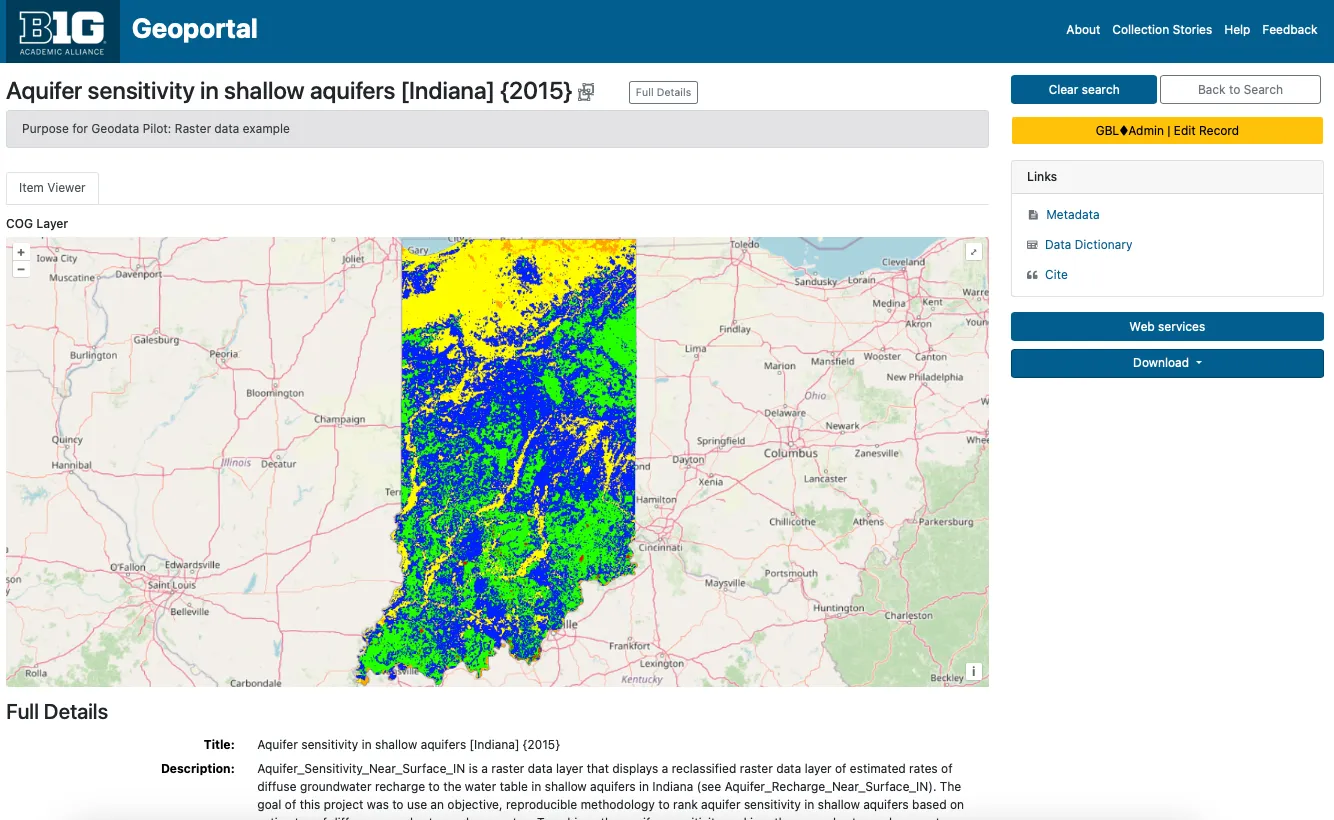
Cloud Optimized GeoTIFF for a raster dataset Indiana. Geological Survey. (2015). Aquifer sensitivity in shallow aquifers [Indiana] (2015). BTAA-GIN. (dataset) https://geodev.btaa.org/catalog/btaa-0d1f5c0e-f93f-4889-be34-16104f9c6927
To improve resource interpretation, we have added data dictionaries as supplemental tables. The dictionaries include field names, types, definitions, and definitions sources. The tables also support nested values.
The Geodata Collection initiative has allowed us to address a long-standing concern: documenting data dictionaries. Often referred to as attribute table definitions or codebooks, data dictionaries describe a dataset’s internal structure and provide information for understanding its contents.
In the past, our efforts have focused on descriptive metadata (titles, authors, dates, subjects, etc.) to help users find resources. We have devoted less attention to helping users evaluate resources. However, user feedback has consistently shown that data dictionaries are highly desired. Many users even assume this information is already included in metadata, leading to confusion when it is not readily available.
The challenge of documenting data dictionaries has persisted for years. The earlier geospatial metadata standard, FGDC, provided a structured format for this information through its Entities and Attributes section. However, the subsequent ISO 191xx standards replaced this section with ISO 19110, a standalone format for data dictionaries. Despite this shift, ISO 19110 files remain rare, likely because tools like ArcGIS do not export field definitions in this format. One exception is Stanford Libraries, which include ISO 19110 files in their dataset downloads. However, these files are not available as previews in their geoportal and are encoded in XML, making them difficult for users to read.
Accessing data dictionaries is often a frustrating process for users, as the information is inconsistently stored across FGDC files, plain text files, or external websites. To address this, we have consolidated the information into a standardized table format. Users can now access data dictionaries directly from the item view page via a clearly labeled link—eliminating the need to search through XML files or external sources.
Our data dictionary format is modeled on the FGDC standard. Using Python scripts, we extract field information from datasets or existing FGDC files and document it in simple CSV files. These CSVs are designed to accommodate nested entries by including a parent field identifier.
While this approach has improved accessibility, many of our data dictionaries remain incomplete. In cases where field definitions are unavailable, we at least provide field names and types as extracted by our scripts. By storing this information in tables rather than static files, we retain the flexibility to update the dictionaries as new information becomes available. Even in their current state, these tables help users gain a clearer understanding of a dataset’s contents simply by browsing the field names.
Data Dictionary Preview
Screenshot of Data Dictionary preview (https://geodev.btaa.org/catalog/btaa-e4a8461e-6cd1-4c45-b6e8-5838bfe6bde3)
Nested Values Preview
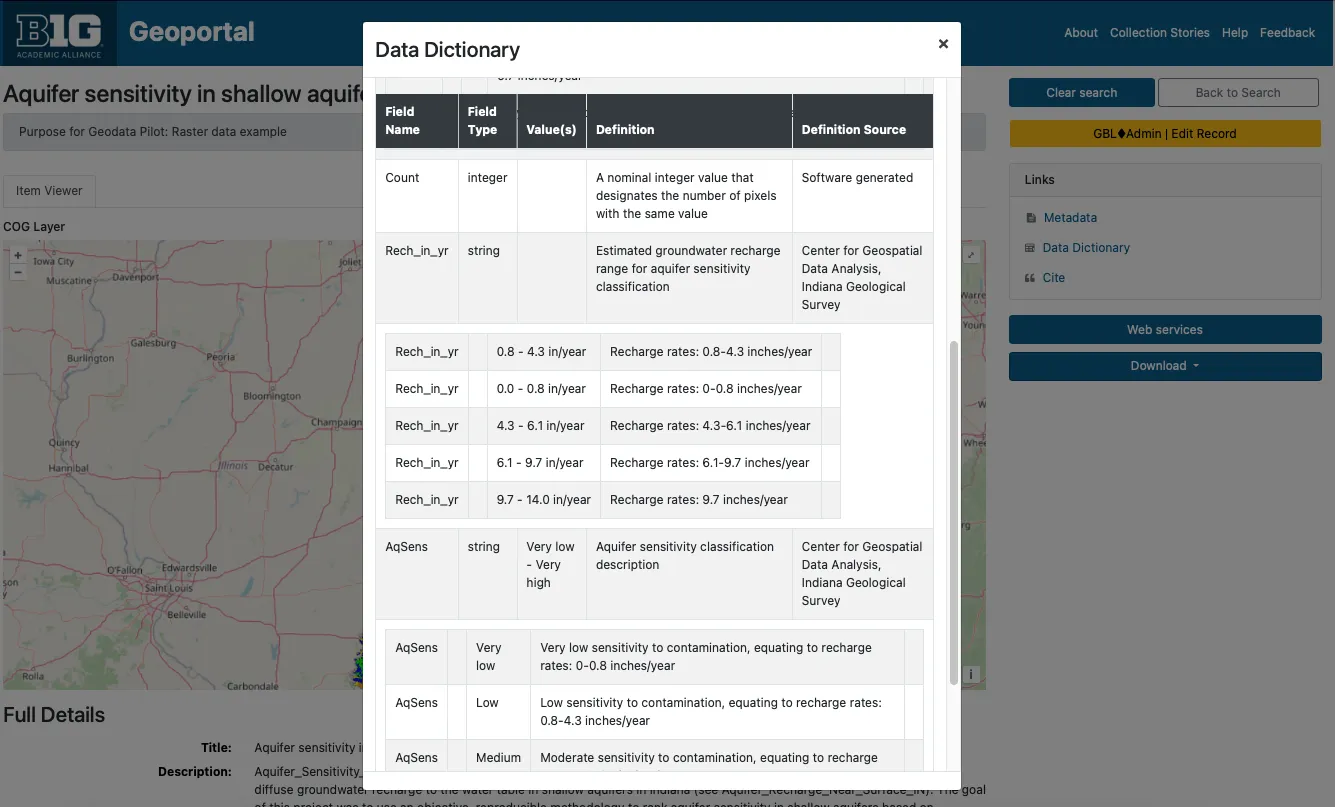
Screenshot of data dictionary with nested values. (https://geodev.btaa.org/catalog/btaa-0d1f5c0e-f93f-4889-be34-16104f9c6927)
We developed several Python scripts to enhance metadata and data processing capabilities. These tools support the collection, documentation, and curation of geospatial datasets, aligning with geospatial metadata standards and improving user experience.
Supported Geospatial Formats:
Metadata extracted
Attribute table fields information extracted
(shapefiles and GeoJSONs)
To ensure data consistency and compatibility, these scripts address common preprocessing needs.
To support the collection, storage, and management of geodata, we enhanced the GeoBlacklight (GBL) Admin tool. Originally designed for metadata workflows, GBL Admin now includes functionality to upload and manage assets, centralize access links, and document data dictionaries. These improvements address the expanded needs of our program and align with best practices for geospatial data management.
The enhancements fall into three key areas:
To enable asset management, we implemented a new workflow for uploading, attaching, and managing files. Key enhancements include:
*Amazon S3 Integration-
*File Management and Background Processing-
AssetsController with accompanying views to manage file assets in S3.dct_references_s).How It Works
dct_references_s field in Geoportal metadata.To streamline the management of access links (referred to as “References” in GeoBlacklight), we created a dedicated *Distributions- table. This unified approach replaces scattered interface views across:
Benefits
How It Works
Option 1: Manual Entry
Option 2: Batch Upload
friendlier_id: ID of the main record.reference_type: One of the reference codes (see table below).distribution_url: The asset’s URL.label (optional): Custom label for the Download button.arcgis_dynamic_map_layer: ArcGIS DynamicMapLayerarcgis_feature_layer: ArcGIS FeatureLayerarcgis_image_map_layer: ArcGIS ImageMapLayerarcgis_tiled_map_layer: ArcGIS TiledMapLayercog: COGdocumentation_download: Data dictionary / documentation downloaddocumentation_external: Full layer descriptiondownload: Direct download fileiiif_image: IIIF Image APIiiif_manifest: IIIF Manifestimage: Image filemetadata_fgdc: Metadata in FGDCmetadata_html: Metadata in HTMLmetadata_iso: Metadata in ISO 19139metadata_mods: Metadata in MODSoembed: oEmbedopen_index_map: OpenIndexMappmtiles: PMTilesthumbnail: Thumbnail filetile_json: TileJSONtile_map_service: Tile Map Servicewcs: Web Coverage Service (WCS)wfs: Web Feature Service (WFS)wmts: WMTSwms: Web Mapping Service (WMS)xyz_tiles: XYZ TilesData dictionaries are essential for documenting field names, types, and values. Previously, these were only stored as static files (e.g., XML, CSV). With the enhancements to GBL Admin, data dictionaries can now be managed in a relational database, offering flexibility and improved displays.
Benefits
How It Works
friendlier_id: ID of the parent record.label: Field label.type: Field type.values: Sample or defined values.definition: Field definition.definition_source: Source of the definition.parent_field: The parent field’s nameOnce the data dictionary has been created, administrators can add, edit, or delete the fields.
This is an initial framework for the steps needed to process datasets for inclusion in the collection.
Link to full collection: https://geodev.btaa.org/?f%5Bpcdm_memberOf_sm%5D%5B%5D=btaa-074bc4ad-ed3d-4fe7-8339-562bc1109cb3
| Title | Purpose | Format | PM Tiles | COG | Thumbnail | Data Dict | Codebook | Original Supplemental metadata |
|---|---|---|---|---|---|---|---|---|
| Amtrak Station Locations [Indiana] (2000) | Point data example | Shapefile | x | x | x (extract from FGDC) | FGDC as HTML | ||
| Aquifer sensitivity in shallow aquifers [Indiana] (2015) | Raster data example | GeoTIFF | x | x | x | nested in data dict. | FGDC as HTML | |
| County Boundaries [Indiana] (2002) | Polygon data example with scale info | Shapefile | x | x | x (extract from FGDC) | FGDC as HTML | ||
| Dams [Nebraska] | Point data from an ArcGIS Hub with generated ISO metadata | Shapefile | x | x | x no definitions | ISO as HTML | ||
| Forest Inventory [Minnesota—Itasca County] (2025) | Geodatabase example | Geodatabase | x | x | part of FGDC | FGDC as XML and HTML |
| Title | Purpose | Format | PM Tiles | COG | Thumbnail | Data Dict | Codebook | Original Supplemental metadata |
|---|---|---|---|---|---|---|---|---|
| Roadway Network [New Jersey] (2023) | Line data; recent version of high priority transportation layer | Shapefile | x | x | ||||
| Roadway Network [New Jersey] (June 2024) | Line data; Current version of high priority transportation layer | Shapefile | x | x | ||||
| Zoning [Minnesota—Olmsted County] (2024) | County dataset with thumbnail. Download is filename, not format name | Shapefile | x | x | ||||
| Zoning [Minnesota—Rochester] (2024) | City dataset with thumbnail | Shapefile | x | x |
| Title | Purpose | Format | PM Tiles | Thumbnail | Data Dict | Codebook | Supplemental metadata |
|---|---|---|---|---|---|---|---|
| Land Use/Land Cover [Maryland] (1973) | Combines a dataset series into one parent record with multiple downloads attached | Shapefile | x | x | x | 2 options available: plain text or nested in data dict. | FGDC as text |
| Land Use/Land Cover [Maryland—Allegany County] (2002) | Connects a dataset series with one parent record and individual records linked as children | Shapefile | x | x | same document attached to all records | FGDC as text for parent record only |
With the Geodata Pilot Collection Workgroup concluding, we are moving into the **Foundation Phase (Phase 2)*- of the program. This stage marks a transition from internal experimentation to external collaboration and public-facing operations. We will focus on four key areas: partnerships, collections, technology, and the publication of our first formal Curation Plan.
The primary goal for this phase is to collaborate with at least two data providers to establish a sustainable workflow for dataset exchange and curation. These partnerships may inform the creation of sharing agreements that ensure clear expectations and communication. By working directly with data providers, we will also gain practical insights into their needs, which will help us refine our metadata guidelines, data ingestion workflows, and curation strategies.
We will continue to iteratively improve our technology. On the front end, this will include BTAA Geoportal enhancements to item view pages. On the backend, we will implement batch ingest functionality.
In collaboration with our data provider partners, we curate our first public-facing collections.
The Foundation Phase will result in the development and publication of Version 1 of the Curation Plan. This document will outline the collection’s scope, metadata framework, and workflows, serving as a reference for both internal and external stakeholders.
The Geodata Collection Roadmap includes five overlapping phases.